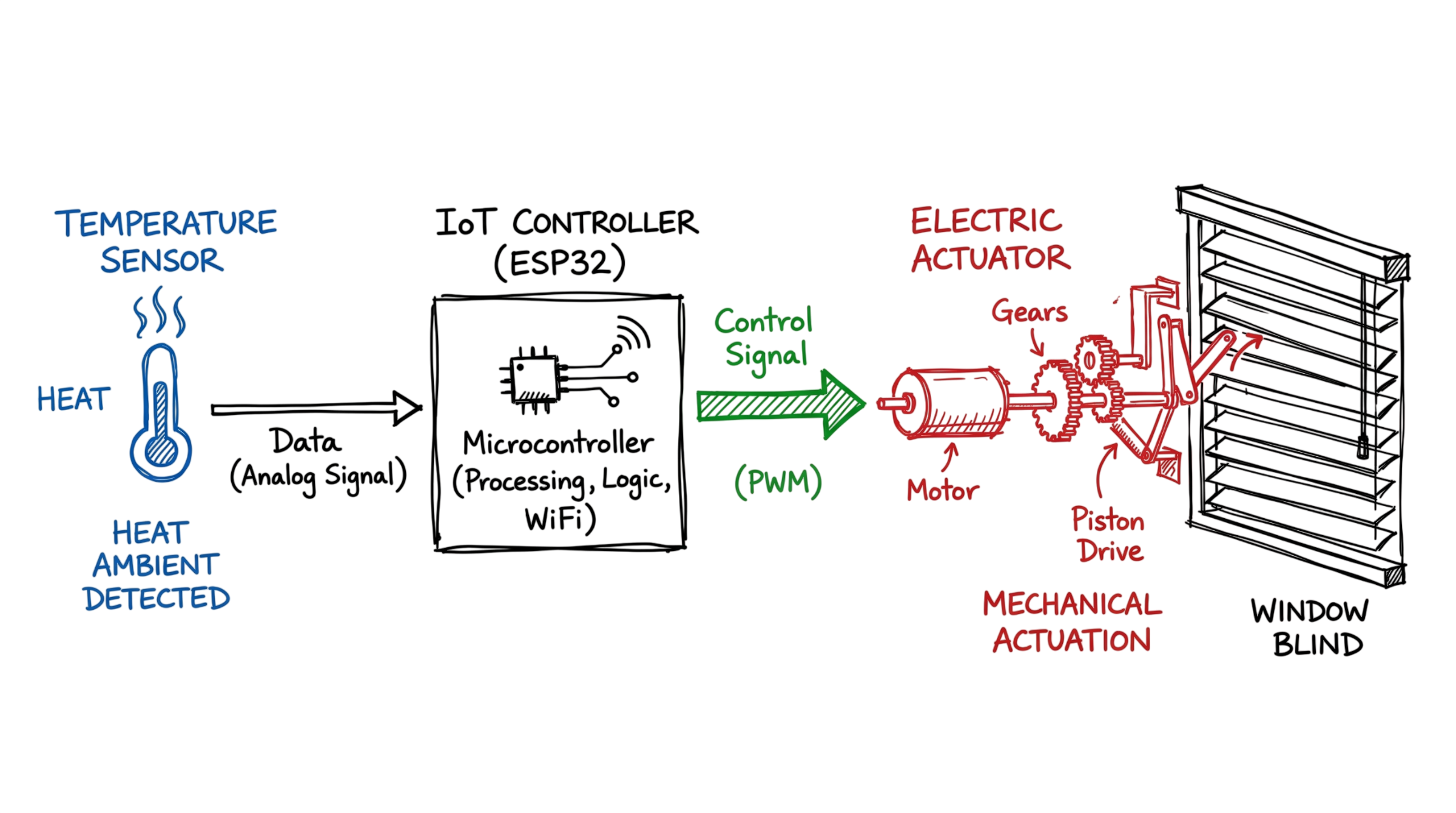
Then, you receive an alert in your phone that your living room is too warm. You simply touch a button on your phone’s screen, and immediately the window blinds close. What happened here? It was a mechanical action of lowering the blinds, caused by the actuator.
The actuators in IoT devices make up for physical work. Sensors gather information. The actuators carry out physical actions. Actuators make a connection between the commands coded in software on the computer’s end and physical actions in the real world. Without actuators, the IoT system will observe your environment and do nothing else.
Let us go back to our previous example and examine what really happens during the process. Your smartphone communicates with other devices via a local network using Wi-Fi or some protocols like MQTT. In the meantime, a certain controller receives an action command. Then the controller transfers the instruction to a specific actuator. The actuator processes the instruction. The actuator receives an electric, hydraulic, or mechanical signal.
For the lowering of the blinds scenario, there is an engine in an actuator that turns. As it turns, the actuator moves the blind. All the other examples of actuators function in a similar fashion – turning the locking mechanism of the smart door lock, rotating the blades in the fan, etc.
Actuators vary according to the way they cause a mechanical motion. Electric actuators dominate IoT devices. They can be found in motors, relays, solenoids, etc. For instance, the relay actuator can open or close contacts of a higher voltage circuit using a smaller voltage from the microcontroller. Pneumatic actuators use air pressure in mostly industrial settings. Hydraulic actuators use fluids and operate similarly.
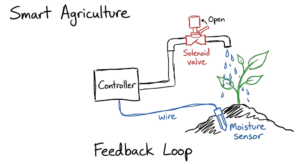
IoT actuators usually work together with sensors in a feedback loop. First of all, a sensor detects a condition (for example, excessive warmth). The sensor sends data to the system that determines whether there is a need to activate an actuator and what action to carry out. An actuator activates the required action (turning on a fan or an air conditioner).
A feedback loop is essential for actuators’ functionality. The following is a simplified version of how it works at home:
- Temperature exceeds 28 degrees Celsius.
• The sensor sends data to the controller.
• The controller checks if there is an action needed due to the predefined rule.
• The actuator activates the cooling fan or an air conditioner.
This is crucial in industrial settings as well. For example, sensors check if the equipment in the factory is overheated. In case it is, the actuator switches off the equipment within seconds.
One aspect of the actuators that we must remember is the amount of power needed. There are actuators that need minimum power for small IoT devices. At the same time, the actuators responsible for moving large gates and other equipment in factories have to be connected to higher voltage with strong torque.
Whenever we implement an IoT device, there is one important question that comes to mind: what action should occur as soon as a particular condition arises?
What is an Actuator in the IoT Ecosystem?
An actuator is a component that turns energy into physical motion. In most IoT systems, this energy comes from electricity, air pressure, or fluid. The device gets a signal from a controller. Then it carries out a task. This might be opening a valve, turning a motor, or locking a door.
Your smart devices rely on this process. To see how this fits together, look at the IoT sensor vs actuator relationship. Sensors detect changes in the environment. They send that data to a processor. The processor decides what to do. Then it tells the actuator to move. This creates a loop where the system senses and acts without your help.
How Actuators in IoT Work
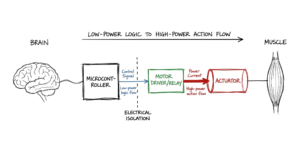
Actuators follow a three-step process. First, they get a low power control signal. This signal usually comes from a microcontroller control unit like an ESP32. These microcontrollers cannot provide enough power to move heavy objects alone. So, we use a driver or a relay as a middleman.
The driver takes that small signal and triggers a larger power source. Then the actuator uses that power to move. This motion is usually linear or rotary.
Linear vs Rotary Motion
- Linear motion: The actuator moves in a straight line. A bolt sliding into a door lock is an example.
- Rotary motion: The actuator spins in a circle. A turning wheel shows this clearly.
The Different Types of Actuators in IoT
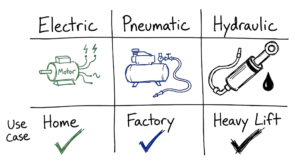
Different tasks require different levels of force. We use various energy types to power these devices. You need to know the difference between hydraulic vs pneumatic actuators and electric ones.
1. Electric Actuators
These are common in consumer products. They use electricity to create motion. They are clean and quiet.
- Motors: These provide continuous rotation. You see them in smart fans and robotic vacuums.
- Solenoids: These use an electromagnetic coil to move a plunger. They work for simple on or off actions like locking a door.
- Piezoelectric Actuators: These use materials that expand when electricity hits them. They give precision for medical tools and high end cameras.
2. Pneumatic Actuators
These use compressed air. You see them often in industrial IoT (IIoT) setups. They are fast and handle repetitive work well. But they need air compressors and tubes. This makes them too bulky for most homes.
3. Hydraulic Actuators
These use pressurized liquids like oil to create force. They are heavy lifters. You find them in construction equipment and factory presses. They move slower than pneumatic types but can move thousands of pounds.
Common Components for Microcontroller Control
If you build projects at home, you will use specific hardware to manage your actuators in IoT.
Motors and Drivers
A DC motor spins fast but is hard to control. We use Servo motors for better accuracy. A Servo moves to a specific angle, like 90 degrees, and stays there. I usually use an L298N motor driver to connect these to an ESP32. This chip manages the power so your microcontroller does not burn out. I’ve spent nights troubleshooting why an ESP32 wouldn’t move a motor, only to find the common ground wire was loose.
Pulse Width Modulation (PWM)
You use Pulse Width Modulation (PWM) to control motor speed. This technique turns the power on and off very quickly. By changing the timing of these pulses, you control the speed or the brightness of an LED. This is where most people get confused. They think it lowers the voltage, but it just pulses the full power.
Relays
A relay is a switch. It lets a tiny 5V signal turn on a heavy 220V appliance. This is how a smart plug controls a coffee machine. It keeps your electronics safe from high voltage spikes.
Real-World Scenario: Smart Agriculture
We recently looked at a project for a large data center. They used hundreds of solenoid valves to manage coolant flow. A small software error caused the valves to cycle too fast. This led to a pressure spike that burst a pipe. It shows that your code must account for the physical limits of the hardware.
On a farm, soil moisture sensors find that a field is dry. That data travels over MQTT to a gateway. The system sends a command back. Electric linear actuators open the water gates. Solenoid valves at the sprinklers click open. Water flows until the sensors report that the soil is damp. Then the system shuts the valves. This happens without a human touching a wrench. It saves water and keeps the crops healthy.
Choosing the Right Actuator
Picking the right device is a big part of system design. A poor choice leads to dead batteries. When you look at your options, check these three factors.
- Force Requirements: How much weight must the device move? Use hydraulics for heavy loads and electrics for light tasks.
- Precision: Do you need a simple switch or exact positioning? Servos and electric linear actuators work best for accuracy.
- Environment: Is the device outside? Pneumatic systems handle heat well. Electric ones might need waterproof cases.
The Role of Software Protocols
Actuators need power and clear instructions. In smart home automation, these instructions follow specific protocols.
- MQTT: This protocol is lightweight. It works well for sending commands over weak connections.
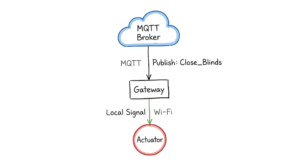
- HTTP: This is standard for the web. It works for gateways but drains the batteries on small sensors.
- WebSockets: These allow real-time talk. You use this for dashboards where you want to see a motor move instantly.
Security Considerations for Actuators
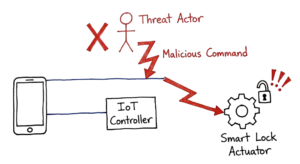
Actuators change the physical world. That makes them targets for hackers. A bad sensor leaks data. A bad actuator causes physical damage.
In 2023, the Mirai botnet targeted over 300,000 IoT devices. If a hacker controls actuators in IoT, they can unlock doors or shut down valves. I once saw a test where a simple lack of encryption allowed a remote user to cycle a lock repeatedly. Use TLS encryption and strong passwords to protect these points.
Conclusion
Actuators in IoT turn data into action. They let software move gears and open doors. You might use electric linear actuators for a project or manage cyber-physical systems in a factory. These devices are the core of the system.
If you understand how they turn energy into motion, you can build better systems. Start small with an ESP32 and a relay. Once you learn the basics of microcontroller control, you can build automation that works in the real world.
Reference: wikipedia
If you want more content on Actuators in IoT and similar topics, visit iot technaga