Have you ever noticed your smartphone synchronizing with your thermostat seamlessly while your workplace computer demands a manual login and navigation through buttons? The devices may just be connected to the internet; however, they operate very differently. Comparing IoT vs Traditional Systems helps one comprehend the intricacies of today’s technology world.
This article will shed light on key distinctions between the two systems. First, we will discuss their data processing mechanisms followed by a discussion of security requirements. After completing the article, you will be able to differentiate between the two with certainty.
What Is IoT vs Traditional Systems?
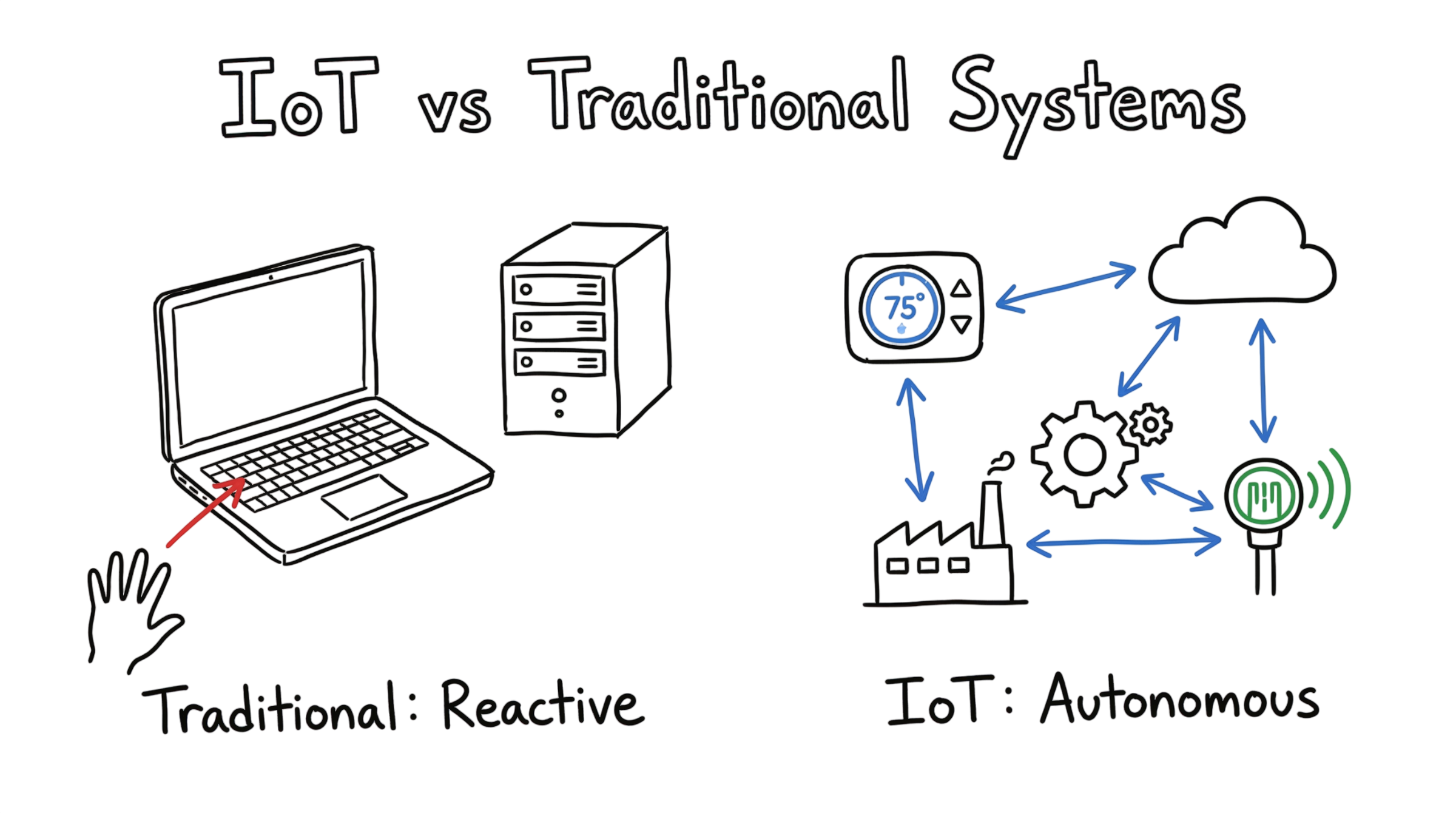
A traditional system is your laptop or an office server. These systems rely on human input. You type on a keyboard or click a link to get a result. This is a reactive setup.
IoT stands for the Internet of Things, which is a system of connected objects that have sensors as well as software to communicate. The data collected from these things is communicated without any intervention from the user. A smart watch and industrial equipment would be perfect examples of such technology. Digital files created by users are processed by existing systems.
Here is the thing. Traditional systems wait for you. IoT systems act on their own based on what they feel in the room. One is built for people to use. The other is built for machines to talk to each other.
| Feature | Traditional Systems | IoT Systems |
| User Input | High (Human-led) | Low (Autonomous) |
| Data Source | Keyboards and Files | Sensors and Actuators |
| Location | Offices and Data Centers | Everywhere (Cities, Farms, Homes) |
| Goal | Communication and Productivity | Automation and Monitoring |
How Does IoT Work?
IoT systems follow a path to get things done. They do not just sit on the internet. They move through four clear steps. This is where most people get confused about how the hardware actually talks to the software.
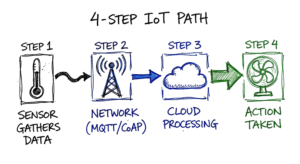
- Sensors gather data. A device uses a sensor to check the environment. This might be a thermometer checking heat or a camera seeing motion.
- The device sends the data. It uses a network to move that information. Common choices include Wi-Fi or cellular connections. Some use special network protocols like MQTT (Message Queuing Telemetry Transport) or CoAP (Constrained Application Protocol) for low power use.
- Computers process the data. This often happens in the cloud. Software looks at the data to find a pattern. For example, it sees the room is too hot.
- The system takes action. The cloud sends a command back to a device. The device might turn on a fan or send an alert to your phone.
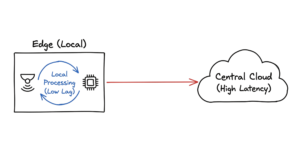
Some systems use edge computing to speed things up. This means the device processes data locally. It does not send it to a far away server. This reduces lag time. Now here’s where it gets interesting for the network guys. When you move processing to the edge, your local traffic spikes even if your cloud bandwidth stays low.
Real World Example: Smart Agriculture
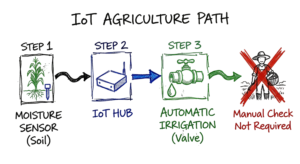
Let’s look at a farm to see the difference. In a traditional setup, a farmer walks to a field to check the soil. They decide if the plants need water and turn on a hose. This takes time and physical effort.
In an IoT setup, the farmer places sensors in the soil. These sensors measure moisture every minute. They send this sensor data to a central hub. When the soil gets too dry, the hub tells the irrigation system to start. The farmer gets a text saying the field was watered.
The farmer saves water because the system only turns on when needed. They also save time. This is the power of real time monitoring. In real environments, it doesn’t work this cleanly because sensors fail or run out of battery. I once saw a site where the irrigation didn’t trigger because a bird nested on the gateway antenna and blocked the signal.
Real World Scenario: The Security Desk
Imagine you are an IT admin at a large factory. One morning, your dashboard shows a spike in traffic. A traditional system attack might involve a worker clicking a bad link in an email. You lock that one computer and fix the issue.
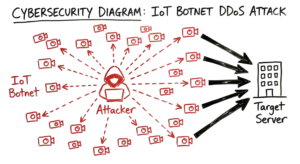
In an IoT world, the problem is bigger. In 2016, the Mirai botnet took over thousands of devices like cameras and routers. It used these devices to crash major websites. As an admin, you must manage a fleet of devices that do not have screens. You cannot just ask a user to change their password. You have to use special device management tools to push a patch to every single sensor at once.
We had a client running Palo Alto NGFWs alongside Zscaler ZIA. Their IoT sensors were failing to authenticate because the SSL (Secure Sockets Layer) inspection was breaking the proprietary certificate pinning used by the manufacturer. It took us two days to find the right bypass rule.
Common Risks and Challenges
Using IoT brings new problems that traditional IT infrastructure does not face.
- Weak passwords are common. Many manufacturers set the same password for every device they sell.
- Updates are hard to do. Many small sensors do not have an easy way to update their software.
- Physical access is a risk. Someone can walk up to a sensor in a public park and steal it or plug into it.
- Data privacy is a concern. Sensors often collect personal data like your location or heart rate.
- Battery life is limited. Many devices must run for years on a single small battery.
- Networks can get crowded. Sending data from thousands of sensors can slow down a Wi-Fi network.
How to Secure and Improve IoT
You can make your systems safer by following a few clear steps. These help you manage your devices better.
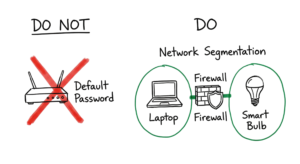
- Change every default password. Never leave a device with the factory settings. Use a unique, long password for every piece of hardware.
- Keep firmware updated. Check the manufacturer’s website for updates once a month. This fixes bugs that hackers use to get in.
- Use a separate network. Put your smart devices on a guest network. This keeps them away from your private files and computers.
- Turn off unused features. If a camera does not need to talk to the cloud, turn that feature off. This limits ways for an attacker to enter.
- Encrypt your data. Ensure your devices use TLS (Transport Layer Security) or SSL when sending data. This keeps the information private while it travels.
- Monitor your traffic. Use tools to see what your devices are doing. If a light bulb starts sending a lot of data to a foreign country, something is wrong.
I once spent six hours tracking a network loop only to find a smart bulb was flooding the VLAN because its firmware crashed after a power outage. It reminded me that you cannot always trust what the vendor says about reliability. You have to verify it yourself.
Tools and Technologies
There are many tools that help you run an IoT system. Here are some of the most popular ones used today.
| Tool Name | What It Does | Use Case |
| MQTT | A lightweight message protocol. | Sending data from small sensors with low power. |
| Wireshark | A tool that looks at network traffic. | Checking if a device is sending data safely. |
| AWS IoT Core | A cloud platform for devices. | Connecting millions of sensors to a single database. |
| Shodan | A search engine for connected devices. | Finding out which of your devices are visible to the public. |
| Node RED | A visual tool for wiring devices. | Creating simple rules for how your smart home works. |
Frequently Asked Questions (FAQs)
Q1: Is IoT costlier than normal systems?
Answer: There will be increased initial costs since there is a need for various sensors. Nevertheless, one ends up saving costs by automating things and thus avoiding costly machine breakdowns.
Q2: Can IoT be implemented without the internet?
Answer: Yes. One can use local network connections between the devices. It is also safer compared to when one uses the internet at home and in factories. One requires the internet to check on data from long distances.
Q3: Why do we have various network protocols in IoT?
Answer: Standard protocols such as HTTP consume too much energy. Therefore, small sensors require efficient protocols that use less battery. These are light protocols that transmit tiny bits of data.
Q4: Do we need a specialized computer to control IoT devices?
Answer: No. One can use any computer, laptop, or smartphone with the appropriate software to control their IoT devices.
Q5: In what way is IoT different from other systems?
Answer: The major difference lies in how the two systems interact with the surroundings. Normal systems work on processing digital information provided by humans. IoT works with physical information from the environment.
Conclusion
IoT vs Traditional Systems: The discussion here is not about which system is better than the other but using the right tool for the right job. For instance, while traditional systems have their strengths in office or manual environments, IoT systems thrive in applications involving monitoring the entire city, farms, and even manufacturing plants in real time.
Here are three important insights that will help you effectively implement these technologies:
- IoT systems run automatically using sensors.
- Cybersecurity requires consistent upgrades and isolation.
- Gathering data without taking action based on the results is useless.
Technology progresses quickly. Getting to know how these technologies relate to each other will help guarantee success in the future. Protect your personal gadgets today.
If you’re new to IoT, start with our detailed guide on What is IoT and How It Works
Reference: wikipedia