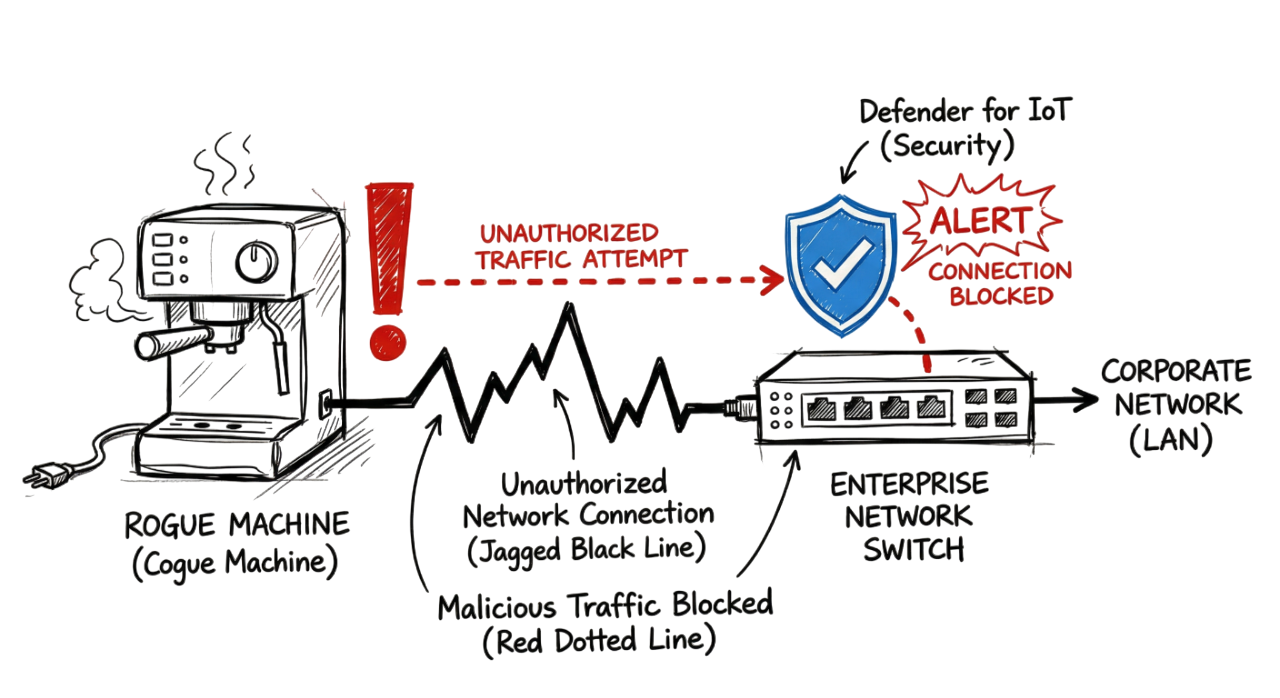
IoT devices in enterprise network environments are often unmanaged and create serious security risks.
You grab your morning coffee and sit down to check the Microsoft Defender portal. A medium severity alert pops up: “Unmanaged device performing network scanning.” You look at the IP. It is not in your asset inventory. You trace it to a network port in the third-floor breakroom. It turns out someone plugged in a smart coffee maker they bought on sale. This is shadow IoT.
In 2026, shadow IoT refers to IoT devices in enterprise network environments that your security team does not know about. These gadgets are cheap and common. People bring them from home because they want convenience. They bring smart picture frames, personal voice assistants, and even smart water bottles. If it has a Wi-Fi chip, it is a potential entry point for attackers.
What is Shadow IoT in IoT Devices in Enterprise Network?
The definition is simple. IoT devices in enterprise network environments often refer to hardware that bypasses your security policy. These devices do not follow your onboarding rules. They do not have your corporate certificates. They often have weak security settings. Many use hardcoded passwords like “admin” or “1234.”
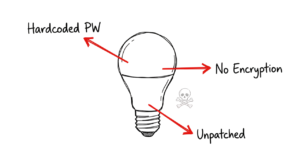
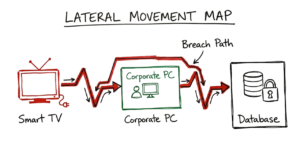
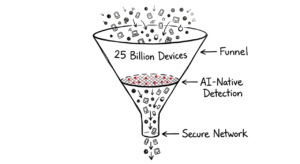
By the end of 2026, we expect over 25 billion connected devices globally. In a big company, you might have thousands of these. Many IoT devices in enterprise network environments remain unpatched, which makes them an easy target for attackers. Hackers find one weak smart bulb, take control of it, and use it as a base to move through your network. They are not after your lightbulbs. They want your data servers.
How Shadow IoT Enters IoT Devices in Enterprise Network Environments
Most of these devices get in through three paths. First, people share the corporate Wi-Fi password. Second, devices connect to the guest Wi-Fi but find a way to talk to internal IPs. Third, people plug things directly into Ethernet ports in common areas.
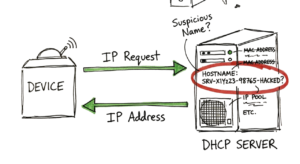
Once a device connects, it asks the DHCP server for an IP address. It then uses protocols like UPnP (Universal Plug and Play) to find other things on the network. Now here’s where it gets interesting. Many of these devices immediately try to “call home” to a cloud server. If that server is in a country with high cyber-threat activity, your firewall should catch it. But if it uses standard HTTPS on port 443, it might look like normal web traffic.
Technical Flow and Architecture
Detection in 2026 relies on a mix of passive and active monitoring. You cannot just run a scan once a week. You need real-time eyes on the wire.
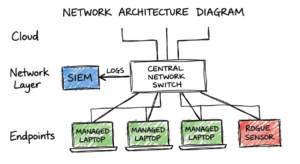
- Traffic Mirroring: You set up a SPAN port or a network TAP. This sends a copy of all network traffic to a sensor.
- Passive Analysis: The sensor looks at the packets. It identifies devices by their MAC address vendor or their communication patterns.
- Active Discovery: Your security tools send out small “probes.” They ask the device, “Who are you?” and look at how it responds.
- Behavioral Baseline: The system learns what is normal. A printer should talk to the print server. If that “printer” starts trying to log into your SQL database, it is a rogue device.
Key Components for Your Stack
To find these devices, you need specific tools working together.
- Microsoft Defender for IoT: This uses your existing managed computers as “sensors” to find unmanaged things nearby.
- SIEM Dashboards: You need a place to collect logs from firewalls, switches, and Wi-Fi controllers.
- Zscaler Private Access (ZPA): This helps by making sure devices can only see what they are explicitly allowed to see.
- NAC (Network Access Control): This is your digital bouncer. If a device has no certificate, the NAC should put it in a restricted VLAN.
Real-World Example: The “Smart” Boardroom
I once worked an incident where a company installed high-end smart TVs in their boardrooms. The installers wanted to save time. Instead of using the isolated guest network, they plugged the TVs into the main corporate LAN.
We started seeing alerts in our SIEM. Those TVs were trying to reach a known malicious IP in Eastern Europe every few minutes. They were part of a botnet. Because we were monitoring outbound DNS requests, we caught the “heartbeat” signal. We realized those TVs had outdated firmware that was vulnerable to a variant of the Mirai malware. This is a classic enterprise level scenario where a simple mistake creates a massive hole.

Practical Implementation: A Step-by-Step Guide
If you want to find these devices today, follow these steps.
Step 1: Check Your DHCP Logs Look for hostnames that do not match your naming convention. If your laptops are named “LAP-DEPT-01,” but you see “Amazon-Echo” or “Tuya-Smart-Plug” in the logs, you found one. This is where most people get confused. They see a weird name and assume it is a glitch. It is usually a real device.
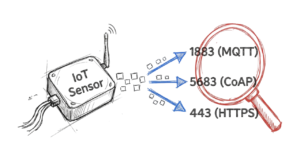
Step 2: Scan for Unusual Ports IoT devices often use specific ports. Look for traffic on port 1883 (MQTT) or 5683 (CoAP). These are common for “chatty” sensors. If an internal IP is hitting these ports on the public internet, it is an IoT device.
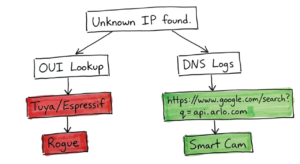
Step 3: Analyze OUI (Organizationally Unique Identifiers) Take the first six characters of any suspicious MAC address. Plug them into an online OUI lookup tool. If the vendor is “Espressif” or “Shenzhen Huasheng,” you are likely looking at a cheap smart home chip, not a corporate laptop.
Step 4: Use Discovery Probes Use your security scanner to send an SNMP or WMI request to the IP. Managed devices will answer with a version number and a name. Rogue devices will usually ignore the request or give a very basic “Busybox” response.
Step 5: Walk the Floor In real environments, it doesn’t work this cleanly. Sometimes the tool tells you a device is at “Switch 4, Port 12.” You have to actually go to that room and look under the desk. You might find a rogue Wi-Fi router or a smart camera hidden behind a plant.
Advantages and Limitations
The main advantage of modern detection is visibility. You cannot protect what you cannot see. Knowing every MAC address on your wire is the first step to a secure network.
The limitation is “noise.” If you scan your network too aggressively, you can crash old hardware. I have seen a basic Nmap scan freeze a legacy medical device in a hospital. This is a personal insight I give to every junior engineer: Always test your scanning intensity in a lab before you hit the production floor.
Common Mistakes to Avoid
The biggest error is trusting MAC addresses. In 2026, many devices will use MAC randomization for privacy. This makes it look like a new device joins every hour. You have to look at the behavior, not just the address.
Another mistake is ignoring the guest Wi-Fi. Many engineers think “it is just the guest network, so it is safe.” But if your guest network can reach your internal web portals or login pages, a hacker can use a rogue device on the guest Wi-Fi to launch a brute-force attack.
Best Practices for 2026
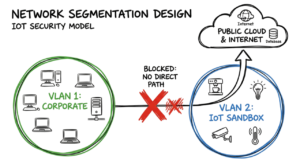
- Segment Your Network: Put all IoT on its own VLAN. It should have no path to your data center.
- Disable UPnP: This protocol allows devices to open their own firewall ports. Turn it off on every router.
- Enforce MFA: Even for the apps that control these devices.
- Use AI-Driven Fingerprinting: Tools in 2026 can identify a device by the size and timing of its packets. This is much harder to fake than a MAC address.

Troubleshooting Scenario: The Ghost IP
You find an IP that is very active, but it does not respond to pings. It shows up in your ARP table, but it has no hostname.
First, check your Wi-Fi controller. Find which Access Point (AP) it is talking to. Second, look at the signal strength. If the signal is very strong, the device is close to that AP. Third, check the DNS logs for that IP. Is it trying to reach “https://www.google.com/search?q=api.arlo.com” or “https://www.google.com/search?q=nest-factory.google.com”? This tells you exactly what the device is, even if it won’t talk to you directly.
Interview Questions for Junior Engineers
- What is an OUI and how does it help identify rogue hardware?
- Why is network segmentation more effective than just blocking MAC addresses?
- What are the risks of using active scanning on a production network?
- If an IoT device is encrypted, how can you still identify its type?
- What common ports do IoT devices use to communicate with cloud controllers?
Future Trends (2026 and Beyond)
We are seeing the rise of “Agentic AI” in IoT devices in enterprise network environments. This means devices will soon make their own decisions about where to send data. 5G-Advanced and Wi-Fi 7 are making these IoT devices in enterprise network environments faster and harder to track because they can jump between frequencies.
The “Matter” protocol is now a standard for smart homes, but it is moving into offices too. It makes IoT devices in enterprise network environments more interoperable, but it also creates a massive web of connected things. You will need automated tools to manage these IoT devices in enterprise network environments. You cannot do it manually anymore.
FAQ
Can I just block all unknown MAC addresses? You can, but you will break things. Many legitimate devices use random MACs. You should alert and verify before you block.
Is a smart fridge really a threat? Yes. It is a computer with an operating system. If it is on your network, it can be used to scan for vulnerabilities in your servers.
Do I need a separate tool for IoT security? Not always. In 2026, tools like Microsoft Defender and your SIEM can do 90% of the work if you configure them correctly.
What is the “Matter” protocol? It is a new language that allows different smart devices to talk to each other. It is great for users but creates more “east-west” traffic for you to monitor.
Should we allow personal devices on the corporate Wi-Fi? No. Use a strictly isolated Guest VLAN that only has a path to the public internet.
Conclusion
Finding shadow IoT in IoT devices in enterprise network environments is an ongoing challenge. You have to be proactive. Use your logs, trust your SIEM alerts, and do not be afraid to go look at the hardware yourself. Be honest about your visibility into IoT devices in enterprise network environments. If you don’t know what is plugged into that switch in the breakroom, find out today. Your network security depends on it.
Learn more about network security fundamentals
Learn how IoT works