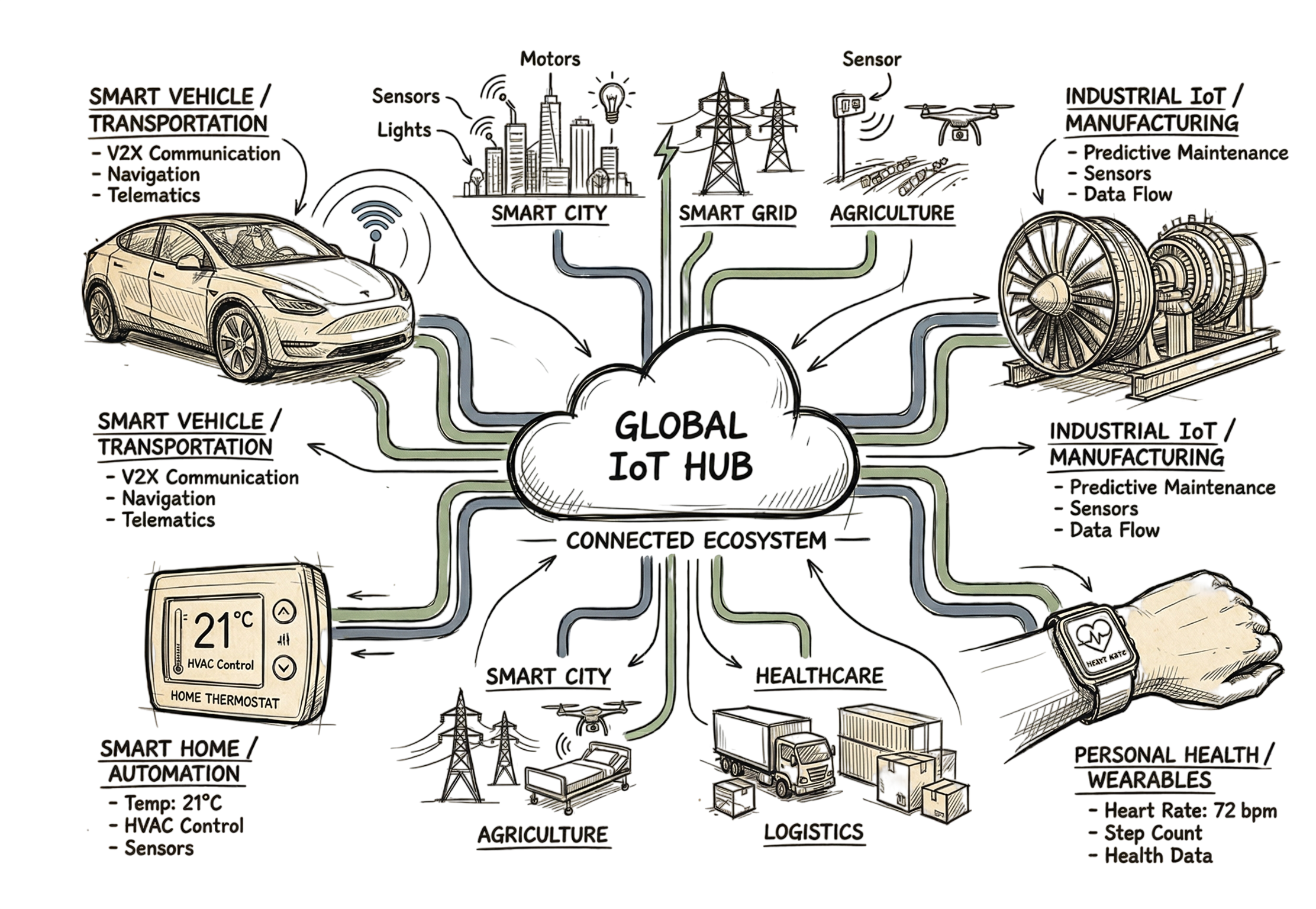
Accordingly, in 2033, we expect that there will be 40 billion connected devices. This translates to 14 intelligent devices being in your household. Through this tutorial, learn about IoT and its effect on your life. Everything about IoT will be explained to you, including the security issues that might expose your personal information.
To benefit from the technology that is already at our disposal, you must understand IoT. IoT has already become part of our lives in terms of vehicles, kitchen devices, and even in clinics. You can use it to save on energy bills and monitor your health. At the end of this tutorial, you will be able to interact with your devices.
What is IoT?
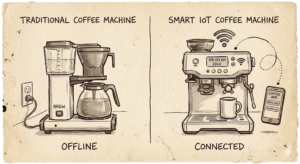
IoT is defined as the system whereby physical objects communicate with one another via IoT sensors and software and exchange data through the internet. The physical objects range from simple household tools to huge industrial systems. Each object has its identifier for communication of data without human intervention.
What is exciting is that we are not dealing with devices like computers anymore but devices that never communicated via the internet such as a light bulb or water valve. Smart bulb is connected to your network. It tells you how much energy it consumes. The moment you leave the room, the light bulb switches itself off. That is the way to tell that the bulb is IoT.
How Does IoT Work?
Moving data from a physical object to your phone involves four specific stages. Every stage must work for the whole system to be effective.
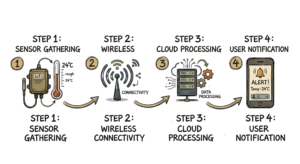
- Data Collection: Devices use IoT sensors to pick up information from the world. A smart thermostat checks the temperature. A moisture sensor in a garden checks if the soil is dry.
- Connectivity: The device sends that data to a server in the cloud. It uses Wi-Fi, Bluetooth, or a cellular signal. Some industrial setups use specialized protocols like LoRaWAN for long range.
- Data Processing: Once the data is in the cloud, software looks at it. The system decides if an action is needed. If a sensor sees smoke, the software identifies a fire.
- User Interface: The system sends a result back to you. You might get an alert on your phone. Sometimes the device just acts on its own. A smart lock might open when it sees your phone is at the door.
This is where most people get confused. They think the device is doing all the thinking locally. In reality, the device is often just a terminal that gathers data while a powerful server elsewhere makes the decisions.
Real-World Example: Transforming Urban Life

The concept of smart cities explains how this process can be applied on an unprecedented scale. Barcelona is a great illustration of this. They started putting sensors all throughout the city back in 2012. This helped them to optimize their approaches towards garbage collection and parking lots.
Barcelona’s garbage cans are outfitted with sensors that let the municipal authority know how much trash is inside. Fuel is saved since only full garbage cans are picked up. The same thing applies to the parking lots. There are sensors installed there that help drivers determine whether the lot is taken using an app.
Street lights there use sensors too. They dim when the street is empty and get brighter when someone walks by. This saves a lot of power. These Internet of Things examples show how data can make a city work better for everyone.
In practical implementations, things do not go so smoothly. The case we faced involved clients with Palo Alto Next Generation Firewalls co-existing with Zscaler ZIA, where split tunneling settings were making DNS requests occur outside the tunnel, resulting in disconnection from city servers on IoT gateways.
Real-World Scenario: Predictive Maintenance in Factories
Imagine you are an engineer in a factory with a row of large turbines. These machines cost a lot to fix if they break without warning. You would use industrial IoT to check the vibration and heat of every part.
Recently, the system saw a tiny increase in vibration on “Turbine 4.” A human would never notice that change by listening. But the AI looked at the sensor data and saw a bearing would fail within 48 hours. The engineer fixed it during a lunch break. This saved the company $50,000 and kept the factory running.
Common Risks and Challenges
The IoT benefits are great, but the technology has some serious issues. Security is the biggest problem for users and companies.
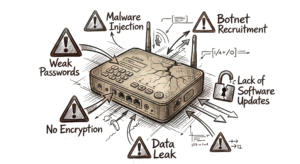
- Use of Weak Passwords: Very few users have the habit of updating their passwords from the preset ones in their device. Mirai Botnet attacks used default factory passwords such as “admin” and “12345” and compromised more than 300,000 IoT devices in the year 2023.
- Lack of Encryption: Some of the inexpensive gadgets leak your information using unencrypted means. This means that any malicious person on the Wi-Fi network will be able to gain access to your personal information.
- Inconsistency in Updating Outdated Software: In some instances, certain organizations do not update their software in order to address any existing security holes that can be exploited.
- Privacy Concerns: Smart speakers and cameras store data that is very private in nature, and the consumers using such products do not know about this issue.
- Complexity: Managing ten applications for controlling ten different IoT devices is indeed difficult.
I once spent four hours troubleshooting a smart sensor only to find the manufacturer hardcoded the DNS settings to a server that no longer existed. This happens more often than you would think with budget hardware.
How to Improve IoT Security
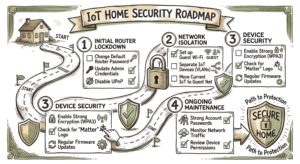
You can do a few things right now to make your home network safer. These steps make it much harder for someone to get into your system.
- Use Strong Login Information: Change the username and password that comes installed in every device from the factory and use unique login information on all items.
- Set Up a Guest Network: Use a separate wireless network exclusively for your smart devices, so that if an attacker breaks one device such as a light bulb, he cannot access your laptop.
- Turn Off UPnP Feature: This technology allows for easy interconnection of the devices by letting them skip the firewall, which creates many security vulnerabilities.
- Enable Automatic Installation of Software Updates: Access the device settings and make sure they are set to update automatically.
- Purchase Products Featuring a Matter Logo: When you are purchasing any new products, select those that feature a Matter logo.
- Deactivate Microphone and Camera Functions: In case you don’t use the voice command option on your TV, turn off this function.
IoT Tools and Technologies
If you work in this field, you will use specific tools to keep things running. Here are a few real ones used by professionals.
| Tool Name | What it Does | Use Case |
| AWS IoT Core | Connects devices to the cloud | Companies managing millions of sensors at once. |
| Matter | A shared language for devices | Making a light from one brand work with a hub from another. |
| MQTT | A messaging protocol | Sending data quickly when the internet connection is weak. |
| Wireshark | A network analyzer | Checking if a device is sending your data without protection. |
| Home Assistant | A central control platform | Users who want to control their home without using a company’s cloud. |
Frequently Asked Questions (FAQs)
Q1: In what way does the Internet of Things vary from the internet that you currently use?
Answer: The usual internet is made for those who surf websites or view videos by using their browser and applications. However, the Internet of Things is specifically for machines communicating between each other automatically.
Q2: Will all IoT devices always be listening to or monitoring us?
Answer: Smart speakers only begin talking when hearing the trigger word. Nevertheless, it might happen that some devices have poor construction or become hacked. Thus, it is always advisable to click the mute option whenever possible or customize privacy settings.
Q3: Is it obligatory for IoT devices to use Wi-Fi technology?
Answer: No, it is not required. For instance, some devices use Bluetooth or Zigbee connections. Some sensors at distant locations might use satellite technology.
Q4: Is it true that smartphones are also IoT devices?
Answer: Typically, people refer to phones as portable computers. Moreover, the sensors included in smartphones have comparable functionalities to IoT devices that can indicate directions or our well-being.
Q5: What can I do to make a smart home?
Answer: You should look for a compatible hub that supports Matter technology. In this way, your home will include different types of devices, including lamps, door locks, and power outlets.
Conclusion
Understanding the IoT will equip you with adequate knowledge on what to consider when buying tech gadgets. IoT refers to the use of information gathered using sensors to enhance processes. This may involve intelligent cities optimizing energy usage or industries identifying machine failures before breakdowns.
It is essential to keep your IoT updated by resetting your password and upgrading your software. When the world gets to 40 billion IoT devices, it becomes crucial to know how these devices work. Technology will have a significant role in enhancing living conditions in the future.
Reference: wikipedia
If you want to read more blogs on IoT, visit iot.technaga.com